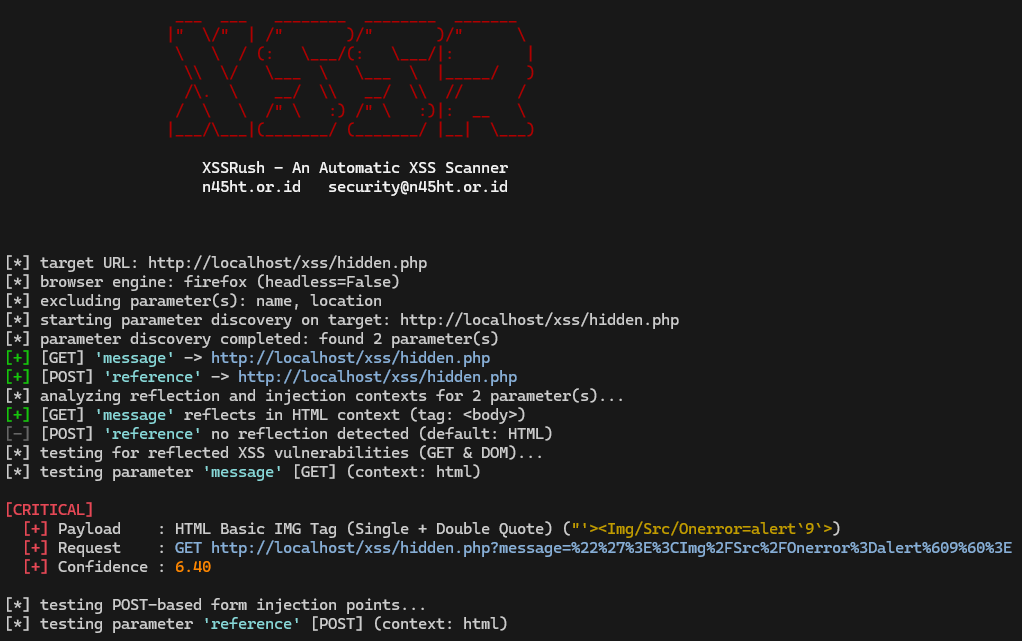
A fast, modular scanner powered by headless Playwright browser automation. Accurately mines parameters, detects canary reflections, maps context boundaries, and verifies real DOM & HTTP cross-site scripting vulnerabilities without false positives.
Freely available on GitHub for the security community.
Native Firefox, Chromium & WebKit engine support.
From Parameter Mining to Headers & Hash Sinks.
Runs entirely local. No database, server, or API needed.
XSSR eliminates blind payload spray by validating reflections inside real headless browser contexts before firing targeted exploits.
Operates real browser instances using Playwright with support for Firefox, Chromium, and WebKit. Catches JavaScript-rendered sinks and Single Page Applications (SPAs) that traditional HTTP scrapers miss.
Probes inputs using unique alphanumeric canary tokens to discover DOM reflection points and classifies exact injection contexts (HTML body, attributes, scripts, URL schemes, DOM JS).
Hooks browser-level dialogs (alert(), confirm(), prompt()) directly inside the browser event loop. Guaranteed verification of code execution with zero false positives.
Detects hidden and visible form inputs, populates valid dummy values, and dispatches real requestSubmit() calls with browser execution. Automatically generates ready-to-use base64 HTML PoCs.
Extracts query strings, hidden HTML inputs, and global window scope properties from the DOM, augmented with built-in or custom wordlists (general params, redirect targets, custom lists).
Presents high-fidelity formatted terminal tables with colorized severity ratings, payload details, confidence scores, and clean JSON file exports for CI/CD integration and reporting.
From discovery to payload trigger, XSSR executes a systematic sequence tailored to exploit all modern XSS attack surfaces.
Scrapes query strings, parses DOM input elements, inspects global window variables, and probes hidden parameters using embedded wordlists.
Sends randomized canary tokens (n45ht...) to discover where inputs reflect and classifies context boundaries (HTML body, attributes, script blocks).
Fires context-tuned injection payloads into query and DOM parameters, listening for real browser execution via dialog interception.
Locates form elements on the target page, fills required controls, dispatches form submissions, and generates base64 HTML reproduction PoCs.
Manipulates URL path segments and directory rewrites to uncover misconfigured routing and template injection vulnerabilities.
Injects payloads into URL hash fragments (#payload) targeting client-side Single Page Application (SPA) DOM sinks and hash routing.
Injects payloads into sensitive HTTP request headers including User-Agent, Referer, Origin, Cookie, and X-Forwarded-* to catch server-side reflections in logs, admin consoles, and status pages.
XSSR is written in pure Python 3.10+ with no external daemons or complicated databases.
# 1. Clone repository from GitHub
git clone https://github.com/N45HT/XSSRush.git
cd XSSRush
# 2. Install Python dependencies
pip install -r requirements.txt
# 3. Install Playwright browser engine (Firefox is default)
playwright install firefox
# Scan query parameters on target URL (defaults to get,post vectors)
python xssr.py -u "https://example.com/search?q=test"
# Run with visible GUI browser window and verbose debugging output
python xssr.py -u "https://example.com/search?q=test" --headless false -v
# Test all attack modules (get, post, path, fragment, header) & save JSON report
python xssr.py -u "https://example.com" --scan all -o scan_report.json
# Use Chromium engine with customized request delay range (ms)
python xssr.py -u "https://example.com" -b chromium --scan all --delay-min 2000 --delay-max 4000
# Audit POST form submissions with custom postfields data
python xssr.py -u "https://example.com/contact" --scan post -d "username=admin&search=keyword"
# Exclude specific parameters from being tested
python xssr.py -u "https://example.com/profile" --scan post -e "csrf_token,session_id"
# Probe hidden parameters using custom wordlist file
python xssr.py -u "https://example.com" -w wordlists/common.txt --scan get,post
# Inspect built-in XSS payloads, known parameters, and target HTTP headers
python xssr.py --show-payloads
python xssr.py --show-params
python xssr.py --show-headers
| Option / Flag | Default / Choices | Description |
|---|---|---|
| Target Options | ||
-u, --url URL |
Required | Target URL to scan (e.g. https://example.com/search?q=test). |
| Browser & Engine Options | ||
-b, --browser |
firefox |
Browser engine to use. Choices: firefox, chromium, webkit. |
--headless |
true |
Run browser in headless mode. Choices: true, false. |
--timeout TIMEOUT |
15000 |
Page navigation timeout in milliseconds (default: 15000). |
--delay-min DELAY_MIN |
3000 |
Minimum request delay in milliseconds (default: 3000). |
--delay-max DELAY_MAX |
5000 |
Maximum request delay in milliseconds (default: 5000). |
| Scan Scope Options | ||
--scan MODULES |
get,post |
Modules to test: get, post, path, fragment, header, or all. |
-w, --wordlist FILE |
None | Custom parameter wordlist file to probe (e.g. wordlists/common.txt). |
-d, --data POSTFIELDS |
None | Custom POST data fields (e.g. username=admin&search=keyword). |
-e, --exclude PARAMS |
None | Parameters to skip during testing (comma-separated, e.g. name,location). |
--include-header HEADERS |
None | Custom HTTP headers to add to header scan (comma-separated, e.g. X-User-Agent,X-Referer). |
--exclude-header HEADERS |
None | HTTP headers to skip during header scan (comma-separated, e.g. User-Agent,Referer). |
| Information Options | ||
--show-payloads |
Flag | Show all built-in XSS payloads and exit immediately. |
--show-params |
Flag | Show all built-in known parameters and exit immediately. |
--show-headers |
Flag | Show all built-in target HTTP headers and exit immediately. |
| Output & Reporting Options | ||
-o, --output FILE |
None | Save report JSON (saved to output/ folder unless absolute path is given). |
-v, --verbose |
False |
Enable verbose debugging output in console. |
-h, --help |
Flag | Show CLI help message and exit. |
--version |
Flag | Show program's version number and exit. |